
Time and Attendance Tracking: How to Get Accurate Records Without More Admin
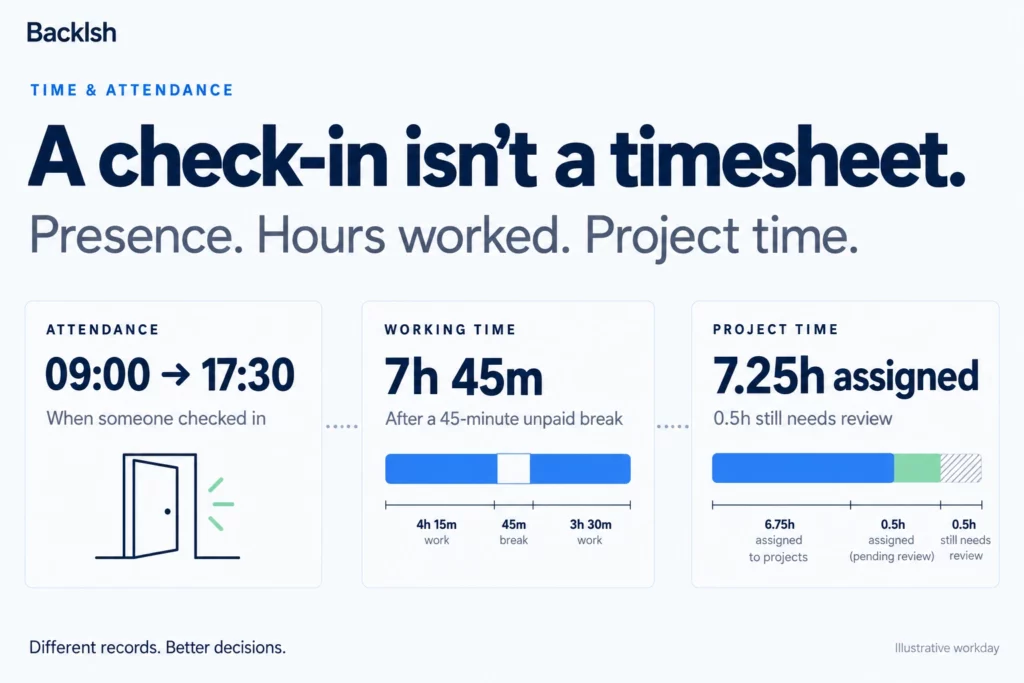
A missed clock-out should not become a payroll guessing game. A badge swipe should not become a substitute for evaluating somebody’s work. And a time tracker should not require a second spreadsheet just to make its reports usable.
If you are choosing or replacing a system, start with the decision you need the record to support. Attendance, payroll and project costing overlap, but they need different information. The most useful setup captures the necessary facts, makes exceptions easy to correct and explains the process to employees.
This guide draws on a recent public Reddit question sample and two documented organizational cases. It does not claim a representative survey or a complete ranking of the latest questions across the internet.
First, separate attendance, hours worked and project time
Attendance records presence or a check-in. Working time records the time a person actually worked, including work that may happen away from a desk. Project time allocates effort to clients, jobs or internal activities. Leave balances record entitlements, accruals, usage and adjustments under your organization’s rules.
One employee can be present for eight hours, have a different amount of working time after relevant breaks, and spend that work across several projects. A location stamp cannot explain the project split. An application timeline cannot identify every phone call or offline task.
| Your main question | Record you need | What it does not establish by itself |
|---|---|---|
| Who checked in at this site? | Attendance event and site | All hours worked or quality of work |
| What hours need payroll review? | Complete work-time record, exceptions and approvals | Applicable pay treatment without the relevant rules |
| What did this client consume? | Reviewed project allocation | Whether every entry is chargeable |
| Who is available next week? | Schedule plus approved leave and commitments | Actual future delivery |
Avoid making one measure do all four jobs. Define the owner, review process and reporting purpose for each.
Case study: a medical practice nearly missed four hours
A practice manager described a small healthcare business using a punch clock, handwritten remote-work records, Excel and a binder for PTO. Employees had to ask the manager to see their leave balance. The manager reported catching an error that almost reduced someone’s recorded time by four hours.
This is a self-reported Reddit account, not an audited finding or a Backlsh customer story. No successful replacement or savings figure was reported. Its practical lesson is the risk created by repeated transcription: map every handoff before selecting software. Read the practice manager’s question.
How do you reduce payroll corrections?
Begin with the path from original entry to approved export. Write down who records the time, who changes it, who approves it and what reaches payroll. Every manual copy is a point to inspect.
A workable process has five stages:
- Capture: retain the original event or employee entry with its date and relevant timezone.
- Check: surface missing clock-outs, duplicates, overlaps and unexpected durations.
- Correct: let the employee explain the issue and propose an adjustment.
- Approve: record the reviewer, reason and before-and-after values.
- Reconcile: compare approved hours with the exported totals before payroll uses them.
A missing entry is an unresolved exception. Do not silently replace it with zero or the scheduled shift. Investigate what happened and document the resolution. Likewise, an overtime alert should trigger review; it should not rewrite actual records to match a target.
For an arithmetic check, use the Backlsh work-hours calculator. For the wider review process, see how to calculate work hours for payroll.
Worked example: reconcile the record before exporting it
The following figures are illustrative, not a payroll rule or a reported customer result.
An employee starts at 09:00, ends at 17:30 and records a 45-minute break that has been verified as unpaid under the applicable rules.
- Elapsed time: 8 hours 30 minutes.
- Less the break: 7 hours 45 minutes.
- Decimal hours: 7 + 45 ÷ 60 = 7.75 hours.
Suppose the project entries total 7.25 hours. The half-hour difference needs an explanation: perhaps internal work was unassigned, an entry is missing or the break was recorded twice. It is not automatically idle time.
Check both sides before changing either record. Attendance reconciliation and project allocation should explain the same day without forcing an invented match.
Case study: a government review found a verification gap
In January 2026, the U.S. Federal Labor Relations Authority’s Office of Inspector General reviewed its variable-week work-schedule program. The report found weaknesses in recording and independently verifying hours. Management cited limitations in the existing timekeeping system and described interim supervisory controls while planning a replacement.
The lesson is organizational: an approval is only meaningful when the reviewer has an adequate basis to verify the record. A software migration does not remove the need for controls in the meantime. This finding concerns that agency’s policy and program; it is not a universal legal requirement for private employers. Read report MAR-26-01.
What should you test for retail shifts and field teams?
A retail user asked why time tracking still involved substantial roster administration, including holiday-entry problems. That is a useful reminder to test exceptions, not just an ordinary shift. The complaint describes one implementation; it does not establish that the platform universally lacks a capability. Read the retail question.
Your pilot should include an overnight shift, approved leave, a holiday, a missed punch, an edited entry, a duplicate import and a deliberately invalid row. Verify what happens when an import partially fails. A safe retry should not duplicate the records that already succeeded.
For field attendance, add a weak connection, a flat battery, denied location permission and a worker visiting multiple sites. Check whether an offline event retains its original timestamp and whether the manager can distinguish that from the later synchronization time.
A geofence can help flag a location exception. It does not establish all time worked, the reason for a failed check or whether travel is payable. Give workers a documented fallback and route exceptions to a reviewer.
How do you keep tracking from becoming intrusive monitoring?
Explain the purpose before the rollout. “We need reviewed hours for payroll and project costing” is a more useful instruction than “We need visibility.”
Tell employees what is collected, when collection starts and stops, who can see the records, how long they are retained and how corrections work. Identify any screenshots, location data or device activity explicitly. Test the actual settings instead of assuming the product name tells you what it captures.
For computer-based work, passive capture may help reconstruct a day, but the resulting timeline still needs review. A document left open is not proof of continuous work. Reading, planning and offline conversations may produce little digital activity.
Keep performance conversations connected to delivery, quality, deadlines and obstacles. A high activity percentage is not a complete assessment of contribution. The manual versus automatic tracking guide explains the different recording approaches; the employee monitoring policy template can help structure the explanation.
Case study: Turnstyle changed what time records were for
Harvest’s published Turnstyle case study describes founders who initially resisted timesheets because of their association with surveillance. As the design agency grew, it needed better information about project budgets and profitability. The team used time records to support estimates, pricing and scope decisions, while allowing convenient recording methods.
This is a vendor-published Harvest customer story, not a Backlsh implementation or independent comparison. No quantified performance improvement is claimed here. The transferable lesson is to connect recording to decisions employees can understand. Read Turnstyle’s story.
How should you evaluate a free time tracker?
A recent buyer question asked for a genuinely usable free option for more than five people. Treat the need as a procurement checklist rather than accepting product recommendations in the comments as verified facts. Free-plan claims and prices can change. Read the buyer’s question.
Check current user limits, manager permissions, editable records, approval history, exports, data retention, device support and the functions available after a trial ends. Run an export yourself. Confirm that you can leave with usable records.
Then estimate the operating cost: subscription fees plus setup, training, correction work and payroll reconciliation. An inexpensive tool with a complicated approval process can consume more management time than expected. This is a way to compare options, not evidence that paid software is always better.
A two-week pilot before a full rollout
Use one representative team rather than the easiest group to onboard.
| Stage | What to do | Evidence to keep |
|---|---|---|
| Days 1–2 | Define purposes, categories, access and owners | A short written process |
| Days 3–5 | Record normal work and test known exceptions | Missing events, duplicates and correction reasons |
| Days 6–8 | Have employees review and managers approve | Review time, unresolved issues and audit history |
| Days 9–10 | Reconcile exports and gather employee feedback | Matched totals and a list of friction points |
Measure correction minutes per pay period, missing events per employee, approval turnaround and export discrepancies. Compare those with your own starting process. Set acceptance criteria around your risks; there is no universal error-rate target established by these forum posts.
Payroll and privacy rules depend on jurisdiction
United States: for workers and records covered by the FLSA, the U.S. Department of Labor describes requirements for accurate hours-and-wages records; it does not mandate one particular form or time-clock product. Federal guidance is not a substitute for checking applicable state and local requirements. DOL recordkeeping guidance.
United Kingdom: ICO worker-monitoring guidance addresses transparency, necessity, proportionality and limiting data collection. A general announcement or employee acknowledgment does not by itself settle every lawful-basis or monitoring issue. ICO guidance.
Elsewhere, check the applicable employment, payroll, privacy and record-retention requirements. In particular, do not copy break deductions, rounding, biometric collection or travel-time treatment from an unrelated jurisdiction.
Frequently asked questions
Is attendance tracking the same as time tracking?
No. A check-in records an event or presence. A working-time record accounts for work performed. Project tracking allocates effort. The records can connect, but one does not automatically replace the others.
What should happen when someone forgets to clock out?
Flag the record, ask the employee to confirm what happened and keep the correction and approval history. Do not assume the absence of a punch means no work occurred.
Can automatic tracking eliminate timesheet review?
No. It can provide a draft record of computer activity. Employees still need a way to add offline work, correct project assignments and resolve missing or overlapping entries.
Do field teams need GPS tracking?
Not always. Compare the actual attendance need with alternatives such as a shared site clock, supervisor confirmation or an employee-reviewed mobile entry. Test location failures and provide a fallback if GPS is used.
Can we keep leave balances in a spreadsheet?
Possibly, if it remains controlled, understandable and reconciled. Define who maintains the ledger, how accruals and adjustments are calculated, and what balance employees can rely on. Moving attendance to another tool does not automatically synchronize leave.
Does an office badge swipe prove a full day of work?
No. It records an access event. A person may work elsewhere, miss a swipe or enter for a different purpose. Explain how attendance reports are used and how employees can challenge errors.
Start with one record you can trust
Choose the record you need, define who reviews it and test the exceptions before expanding the rollout. For desk-based teams exploring automatic capture, review Backlsh’s automatic time-tracking feature against your actual workflow. Attendance hardware, payroll rules, leave management and field-location requirements need their own evaluation.
Research note: reviewed 30 October 2026. The accompanying log contains 20 paraphrased question intents from seven accessible Reddit threads, including multiple explicit questions in some posts. Quora blocked automated access. These are not the 20 globally newest questions, not 20 separate authors and not a cross-platform survey. Search-index dates were used where available; relative ages displayed on opened pages sometimes conflicted. Promotional and vendor-affiliated material was treated as topic discovery, not independent proof of demand or product effectiveness.